Maggie Hicks a 5th grade teacher at Highland Elementary has made a shift. This year students have flexible seating. From yoga balls to pillows on the floor to benches or high top tables, there is a lot to choose from and students are benefiting.

Maggie Hicks - Several years ago I sought answers as to more and more kids just can't seem to sit still. The following is not the article I read but it does encapsulate the gist of it: Why so many kids can’t sit still in school today. I tried GoNoodle (and still use it) but it didn't seem to address the core strength issue. Then, earlier this year a colleague posted a link on Facebook--and that's the real impetus for considering flexible seating: Flexible Seating/Student-Centered Classroom. When I read the next article on "Cemetery Seating" I made up my mind. I spoke with my principal about it and she encouraged me to go for it. I started scrounging for tables right away! So far, I love it and most of the students seem to enjoy it. They enjoy the freedom of being able to choose their own learning spots for the day. It's taken some tweaking along the way (the bins I had just weren't big enough to house all the materials my 5th graders need; some kids actually preferred sitting at traditional desks, so I had to bring some of those back, and I've had to monitor more closely the time the students spend sitting in our "Learning Lounge" (direct instruction area). It's been illuminating to observe which students gravitate toward what type of seating, and how they interact in different groupings. One pet peeve, though, is when they start pounding absentmindedly on the stability balls.
Check out the funding resources below. Contact Maggie: mhicks@lps.k12.co.us
Funding Options
Donors Choose (Support a Classroom, Build a Future)
LPS Foundation (Grants to Teachers)
Shannon Hanschen from Goddard Middle School shares her expertise in a webinar for LPS teachers around using
Teachers at the elementary and middle school levels know that students do not have access to YouTube. This does not need to prevent you from using relevant YouTube videos as part of your content.
You can use a website such as KeepVid to download YouTube videos to your Google Drive then share those videos out to your students.
Step by Step Instructions - KeepVid
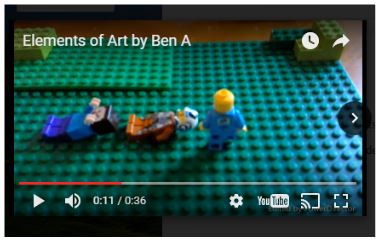
A great student inspired project from Julie Vincelette's art room at Sandburg elementary. Julie uses video to support art concepts, the last one was around primary colors from Sesame Street
which was created using a stop motion technique. Ben, a fifth grader in her class went home and on his own created an Elements of Art video using stop-motion inspired by the video from class. No grade, no extra credit. Students creating, sharing based on interest and exposure to tools that connect with them.
Save a file to multiple locations in Google Drive without making copies.
Open Google Drive
Select one or more files or folders
You can use the Control key on Windows, or Command key on Mac, to select non-consecutive files and folders.
Press SHIFT + Z and you’ll see an “Add to Folder” pop-up
Select the folder where you wish to add the selected files
Click OK
This makes Drive organization easier and if you edit the file inside one folder, all the other instances are updated as well since they are essentially pointing to the same file.